


Splunk Enterprise Security 8 (ES8) represents a significant evolution in the realm of Security Information and Event Management (SIEM). Designed to provide a comprehensive view of security threats and vulnerabilities, ES8 introduces a reimagined workflow and enhanced integrations that streamline the user experience. With a focus on efficiency and clarity, this latest platform transforms traditional dashboards into dynamic, investigative workspaces, empowering security professionals to respond to threats with greater speed and precision.
What is the ES8?
Enterprise Security 8 represents Splunk’s most significant SIEM evolution to date. Built on the foundation of comprehensive threat visibility and vulnerability management, ES8 introduces a workflow-centric approach that moves beyond traditional dashboard-based interfaces. The platform emphasizes active investigation over passive monitoring, creating an environment where security professionals can seamlessly transition from threat detection to response execution.
The core philosophy behind ES8 centers on reducing the cognitive load on security analysts while increasing their operational effectiveness. By integrating advanced automation capabilities and standardizing data formats, the platform enables teams to focus on high-value analytical tasks rather than mundane data manipulation and correlation activities.
What is Different About ES8
Mission Control: The New Command Center
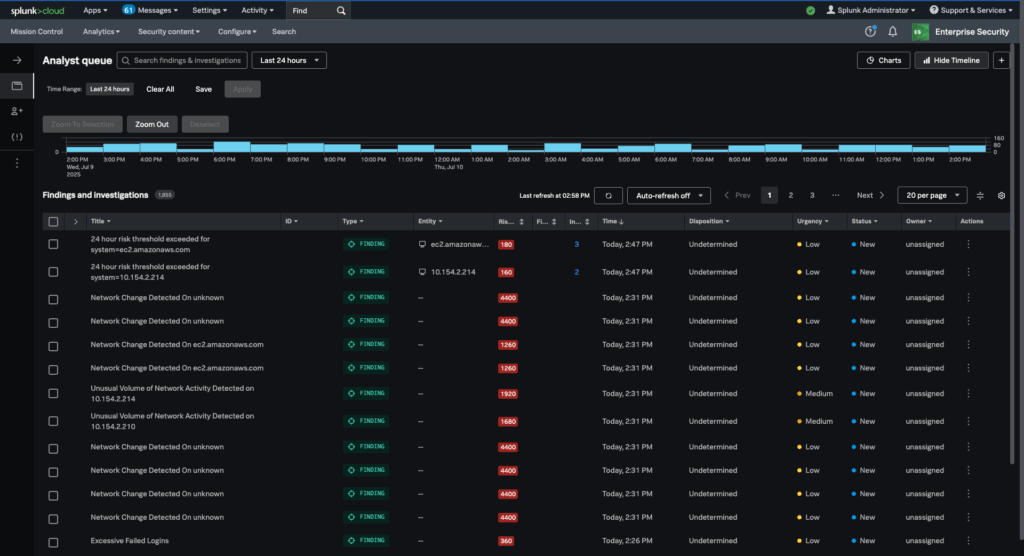
The most visible transformation in ES8 is the introduction of Mission Control, which replaces the traditional Investigation Bar, Workbench, and subsequent dashboards. Mission Control serves as a unified command center that consolidates all investigative activities into a single, cohesive interface. Within Mission Control, analysts can access split-panel views that allow simultaneous monitoring of multiple data streams, threat timelines, and investigation notes. The integrated note-taking system replaces the previous commenting functionality with a more robust annotation framework.
When investigating a possible threat, you can choose a Response Plan with preset instructions to streamline the investigation. When using this Response Plan, the interface adapts dynamically, surfacing relevant tools and data sources based on the current threat scenario. It will guide you through a step-by-step process to draw conclusions on further steps to take. This process reduces the time spent navigating between different screens and ensures that critical information remains accessible throughout the investigation lifecycle.
Enhanced Automation Through SOAR Integration
ES8’s native integration with Security Orchestration, Automation, and Response (SOAR) platforms represents a significant leap forward in automated threat response capabilities. This integration enables organizations to implement sophisticated playbooks that can automatically triage incoming alerts, gather additional context from external sources, and even execute initial response actions without human intervention.
The SOAR integration supports custom workflow development, allowing security teams to create organization-specific automation sequences that align with their incident response procedures. Common use cases include automated vulnerability scanning triggers, threat intelligence enrichment, and stakeholder notification systems that activate based on predefined severity thresholds.
Open Cybersecurity Schema Framework (OCSF) Standardization
The integration of OCSF represents ES8’s commitment to data standardization and interoperability. OCSF provides a unified schema for security event data, eliminating the data normalization challenges that have historically plagued multi-vendor security environments. This standardization enables more effective threat intelligence sharing between organizations and security tools.
ES8 can now natively consume threat indicators from various sources without requiring custom parsing logic, while also contributing to that standard of normalized data back to the broader security community. The OCSF integration supports real-time data transformation, ensuring that incoming security events are automatically formatted according to industry standards. This capability proves particularly valuable for organizations operating in regulated industries where compliance reporting requires standardized data formats.
Upgrade & Implementation Strategy
Splunk Cloud Upgrade Path
Organizations utilizing Splunk Cloud can initiate their ES8 upgrade by contacting Splunk Support with a formal upgrade request. The upgrade process typically involves a scheduled maintenance window during which Splunk’s technical team performs the platform upgrade and conducts initial configuration validation. Prior to upgrading, organizations should conduct a comprehensive audit of their existing correlation searches, custom dashboards, and integration points. There is no rolling back to ES7, so ensure you are ready before submitting a request for an upgrade.
On-Premises Deployment Options
On-premises organizations have greater flexibility in their upgrade approach, with options ranging from self-service upgrades to professional services engagement. The self-service path requires careful attention to system prerequisites, including hardware specifications, network connectivity requirements, and dependent application compatibility. Key prerequisites include ensuring adequate storage capacity for the enhanced data indexing capabilities, verifying network bandwidth for improved real-time processing, and confirming that existing integrations support the updated API endpoints. Organizations should also plan for extended testing periods to validate custom content functionality within the new workflow paradigm.
Training & Adoption Strategies
Successful ES8 implementation requires comprehensive training programs that address both technical and procedural changes. Organizations should plan for initial training sessions covering the new interface navigation, followed by advanced workshops focusing on automation development and threat hunting techniques. The learning curve for existing ES7 users is generally moderate, with most analysts achieving proficiency within 2-3 weeks of regular usage. However, organizations should allocate additional time for advanced feature adoption, particularly for teams developing custom SOAR integrations or implementing complex automation workflows.
Conclusion
To access more Splunk searches, check out Atlas Search Library, which is part of the Atlas Platform. Specifically, Atlas Search Library offers a curated list of optimized searches. These searches empower Splunk users without requiring SPL knowledge. Furthermore, you can create, customize, and maintain your own search library. By doing so, you ensure your users get the most from using Splunk.



